Import Predefined SMART Packages
The Import predefined SMART packages wizard helps you import the data and setup needed to start working. Available packages include the standard chart of accounts, posting groups, basic module setup, postal codes, countries/regions, and currencies.
To import a package:
Choose
 , enter Import predefined SMART packages, and open the page.
Select the packages you need. Turn on Import Package and, if you want the data applied immediately, Apply Package. Then choose Next.
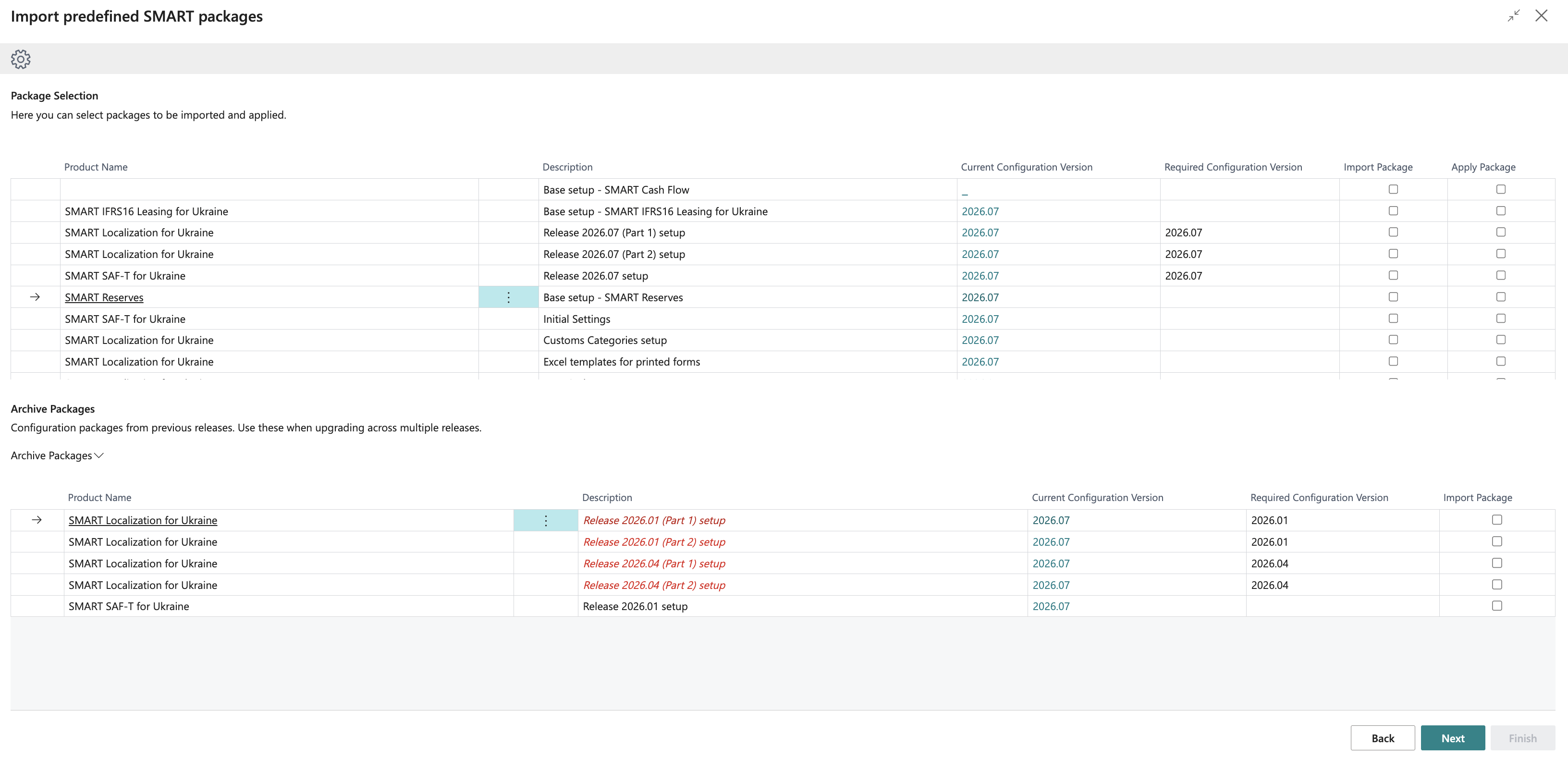
The package is imported to the Configuration Packages page. If you did not select Apply Package, open Configuration Packages and choose Apply Package to apply the data from all tables in the package.
You can also use this wizard to import Excel templates for the printed forms of SMART Localization for Ukraine and setup packages supplied with product updates. The wizard checks whether the installed configuration version matches the updated product version. If the product has been updated but its configuration has not, a notification appears in the Role Center, and the packages requiring an update are highlighted in red on the Import predefined SMART packages page.
Archive Packages
The Archive Packages section contains configuration packages from previous releases. Use them if you skipped a release and need its setup package.
Select Import Package for the archived package and choose Next. After finishing the wizard, choose Apply Package for that package on the Configuration Packages page. Archived packages are imported without being applied automatically.